
Protected viewer layouts & Document formats
For Public (open access) and Private (accessed controlled) usage a range of alternative display formats are available, to suit different document types and publisher's preferences. The main "standard viewer" formats are single page scrolling (continuous), 2-page magazine style, and single page-by-page (presentation, selectable) format. A format selector is generally provided to enable users to switch between formats to suit their preferences and target device size and orientation. Bespoke variants of these formats can be provided as part of project-based service provision, including MS Office files and true PowerPoint operation and display but using HTML5 (so no source files are held on the servers, providing extra security). Icons can be included on bespoke formats for functions like printing or requesting a printed copy of a document, enquiring about other publications or services, help, action after logging out etc. Please see below for examples of the standard formats provided (all are scalable). Note that any of the converted pages can be hosted on your own site using iframe embedding. Examples can be seen here and on our Gallery page
For documents that are image/graphics-based, like comics, manga, graphic novels, photographic portfolios and even music scores, our Graphics viewer can be the best options. Again, this has many publisher-selectable and user-selectable options, as illustrated further down this page and on our Graphics Gallery page
SAMPLE STANDARD VIEWER FORMATS
| Format | Details | |
|---|---|---|
| Continuous scrolling format | Toolbar with sidebar selector for thumbnail display, contents (bookmarks) list and full text searching (see example text searching, below), continuous scrolling vertical page display with side tab arrows for easy page movement on touch-screen devices, optional login/logout and personalized watermarking for access controlled usage. Ideal for textbooks, marketing reports, technical handbooks, training materials and more.. | 
|
| Magazine format | Two-page display with sidebar selector for thumbnail display, contents (bookmarks) list and text searching, side tab arrows for easy page movement on touch-screen devices, plus a range of transition options (flipbook style format is standard). Ideal for magazines, comics, graphic novels and books with larger fonts and graphics for younger children | 
|
| Continuous scrolling with markup format | Apple iPhone portrait display: Format as per Continuous scrolling, but in this case private markup functionality is enabled. This format permits the selection of text (but not copying), and when selected the text may be marked with highlight colors (selectable). Text sections that are highlighted can have Notes associated with them, as illustrated. Markup details are retained between sessions, so when re-accessed from the same web browser, the highlighting and annotation details will be shown on the page | 
|
| Print enabled | Printing from secured documents is normally prevented. However, in this bespoke example, printing of single pages or a limited range of pages is permitted. Printed output includes on-page watermarking identifying the user, date/time etc, as required. In this screenshot we also show the sidebar open with the text searching tab opened and highlighted 'hits' for the word 'goal'. Click on the screen to see the steps as a video in a separate browser window | 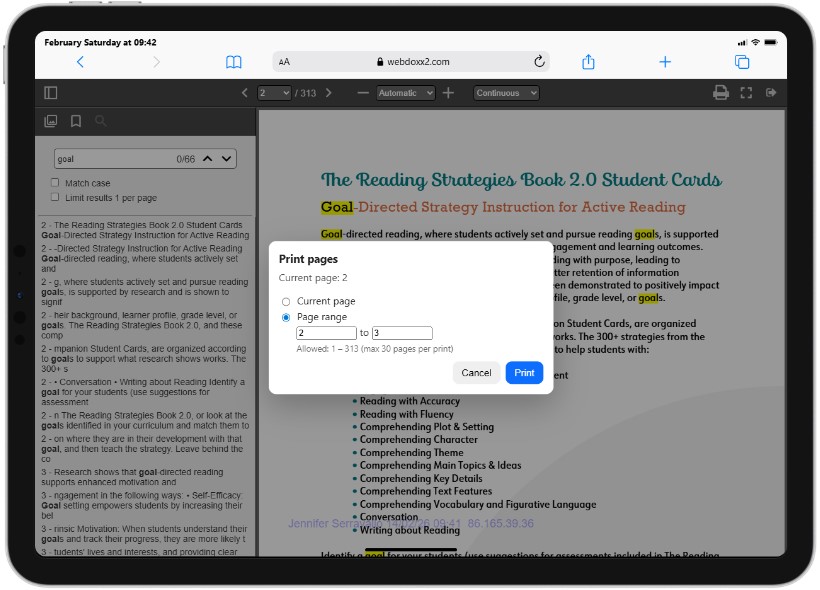
|
SAMPLE GRAPHIC VIEWER FORMATS
| Format | Details | |
|---|---|---|
| Standard format | Upper Toolbar with continuous scrolling vertical page display with side tab arrows for easy page movement on touch-screen devices, optional login/logout and personalized watermarking for access controlled usage. Ideal for comic, graphic novels, photographic portfolios and more.. | 
|
| Manga-style format | Single or Two-page display with side tab arrows for easy page movement on touch-screen devices, with left-right or right-left horizontal scrolling, optional haptic and audio feedback and selected zooming. Ideal for magazines, comics, graphic novels and books with graphics for younger children | 
|